Suno Prompting: How to finish a Suno song
Introduction
Suno AI is a game-changer in the world of music creation. Using advanced algorithms and machine learning, Suno AI lets you generate unique musical compositions with ease. This tool can do it all: from crafting complex melodies to building intricate harmonies, making it a must-have for musicians and producers.
When using Suno AI, effective prompting techniques are key. By mastering these techniques, you can greatly improve the quality of the music generated. Proper annotation and strategic prompts can help achieve desired outcomes, ensuring your compositions sound professional and polished.
In this guide, you’ll learn:
- How to use annotations to create natural song endings in suno.
- Manual suno editing techniques for troubleshooting abrupt song endings.
- Essential tools and techniques for mastering suno songs created with Suno AI.
- Strategies to avoid sampling issues when working with Suno songs.
By following these insights, you can elevate your music production skills using Suno AI, achieving professional-sounding results that stand out in the competitive world of music.
Understanding Suno Prompting
The Role of Annotations in Creating Natural Song Endings
Annotations are a vital tool in guiding Suno AI to produce music that meets your expectations. By inserting specific annotations like [end], [fade out], and [outro] into the lyrics box, you can effectively signal to the AI how you want the song to conclude. These annotations help in crafting a polished and professional finish, ensuring smooth transitions between sections and avoiding abrupt endings.
Types of Annotations
- [end]
- Purpose: Signals a clear cut ending to the song.
- Usage Example: If your composition is meant to end abruptly on a strong note, insert
[end]at the desired point. - Effectiveness: This annotation ensures that Suno AI terminates the audio immediately after the specified point, lending a decisive conclusion.
- [fade out]
- Purpose: Creates a gradual fading effect towards the end.
- Usage Example: To achieve a smooth fading conclusion, place
[fade out]at the point where you want the volume to start diminishing. - Effectiveness: This method helps in blending the final notes seamlessly into silence, providing a natural and gentle finish.
- [outro]
- Purpose: Indicates an extended ending section.
- Usage Example: Use
[outro]when you wish to add an instrumental or thematic conclusion to your track. - Effectiveness: This annotation guides Suno AI to create an elaborate ending sequence, often incorporating additional musical elements for a richer finish.
Application of Annotations
- Smooth Transitions: Combining annotations can create intricate ending sequences. For instance, using
[fade out]followed by[end]can first lower the volume gradually before cutting off completely. - Lyrics example: “This is the last verse I’ll say goodbye [fade out] And end this song [end]”
- Sense of Closure: Applying these techniques provides a sense of closure and complete artistry to your compositions. Using
[outro]can be particularly effective for genres that thrive on instrumental finales. This mirrors the concept explored in Andrew Blackman’s analysis of narrative structures in literature where he discusses the sense of an ending, which can also apply to songwriting. - Lyrics example: “And now we part ways With echoes of our days [outro] Fading into night [fade out]”
- Experimentation: It’s crucial to experiment with different combinations of annotations to see what works best for each track. Given that AI interpretations may vary, multiple attempts might be necessary to achieve the perfect ending.
By mastering these annotation techniques, you’ll have greater control over how Suno AI shapes your music’s conclusion. This not only enhances your compositions but also elevates your overall music production skills. Similar to how certain songs like “Bohemian Rhapsody” have intricate endings that require careful planning and execution, as discussed in this in-depth analysis.
Troubleshooting Abrupt Song Endings with Manual Editing Techniques
Abrupt song endings can be a common issue when using Suno AI for music creation. These unexpected and sudden stops can disrupt the flow and impact the overall listening experience, making the track feel incomplete. Addressing these abrupt endings through manual editing can significantly enhance your compositions.
Step-by-Step Guide on Using Audacity for Manual Editing
To refine problematic sections and achieve a more cohesive listening experience, follow this guide using Audacity, a free audio editing software.
- Download and Install Audacity Visit Audacity’s official website to download and install the software.
- Import Your Track Open Audacity.
- Go to
File>Import>Audio, then select your AI-generated track from Suno. - Identify Problematic Sections Play through your track and identify where the abrupt ending occurs.
- Use the selection tool to highlight the problematic section.
- Apply Fade-Out Effect With the section highlighted, go to
Effect>Fade Out. - This will gradually reduce the volume of the selected portion, creating a smoother transition to silence.
- Adjust Fade-Out Duration If needed, experiment with different lengths for the fade-out effect by adjusting the highlighted section.
- Shorter fades may work for quicker endings, while longer fades can provide a more gradual conclusion.
- Preview and Fine-Tune Listen to the edited track.
- Make further adjustments if necessary until you achieve a seamless ending.
- Export Your Edited Track Once satisfied, export your track by going to
File>Export>Export as MP3/WAV.
While annotation in Suno prompting can guide the AI towards generating more natural song endings, manual edits ensure precision. Combining both methods ensures clear-cut or fading conclusions that meet your artistic vision.
By integrating these techniques, you leverage both Suno AI’s capabilities and manual refinement processes to produce professional-sounding music tracks.
Mastering Tracks Created with Suno AI
Improving audio quality for AI music involves distinct challenges. Suno AI-generated tracks can often lack the desired loudness and consistency, making mastering a critical step to achieve professional-sounding results.
Essential Tools and Techniques for Mastering Music Using Free Software Like FL Studio
Utilizing free tools and plugins effectively can significantly enhance the audio quality of your tracks. Here are some recommended options:
- Soundgoodizer: This plugin is excellent for enhancing overall loudness. By amplifying the harmonic content, it adds warmth and richness to the track.
- Fruity Parametric EQ 2: Precise frequency adjustments are crucial in mastering, and this plugin offers detailed control over the EQ spectrum, allowing you to fine-tune individual frequencies.
- Wave Candy: Monitoring your waveform is essential to avoid clipping and distortion. Wave Candy provides visual feedback on the audio signal, helping you maintain a clean and balanced output.
- BandLab: If you want a do it for you solution.
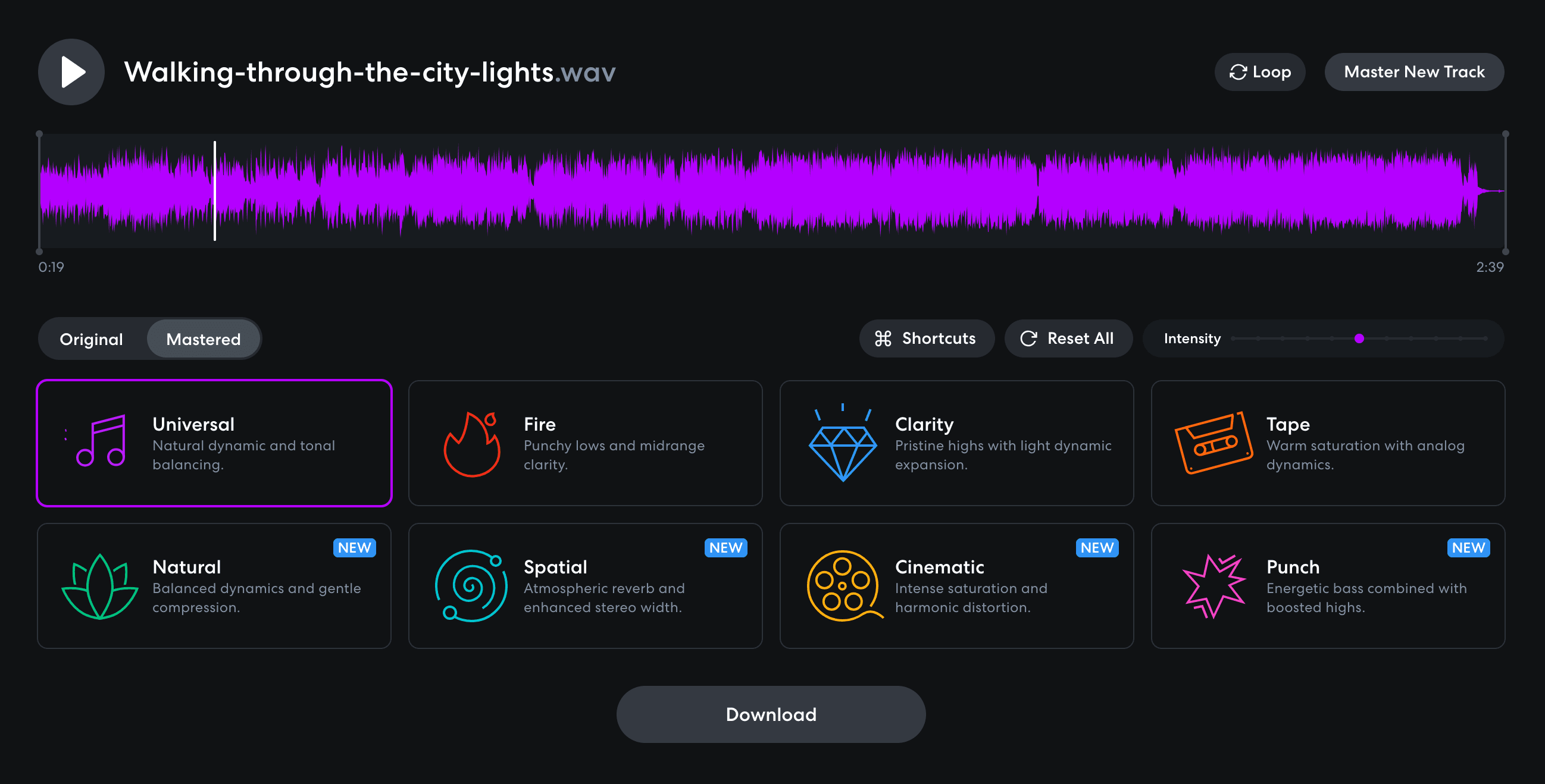
Steps for Effective Mastering
- Normalize Audio Levels:
- Ensure that all sections of your track have consistent volume levels. You can refer to this FL Studio guide on levels and mixing for more information.
- Use normalization features in FL Studio to achieve uniformity.
- Apply Soundgoodizer:
- Insert Soundgoodizer on your master track.
- Adjust the settings to find the sweet spot where the track sounds full without being overly compressed.
- Utilize Fruity Parametric EQ 2:
- Insert Fruity Parametric EQ 2 on your master track.
- Analyze your track’s frequency spectrum and make necessary adjustments:
- Boost low-end frequencies (< 200Hz) for depth.
- Enhance mid-range (500Hz-2kHz) for clarity.
- Tweak high-end frequencies (> 6kHz) for brightness.
- Monitor with Wave Candy:
- Keep an eye on the waveform to ensure there are no peaks causing distortion.
- Adjust Soundgoodizer or other effects if necessary to maintain a balanced signal.
- Finalize with a Limiter:
- Insert a limiter as the final effect on your master track.
- Set it to prevent any peaks from clipping while ensuring your track remains dynamic.
Experimenting with different settings in these plugins can yield various sonic results, often requiring multiple iterations to achieve the desired sound.
By mastering tracks generated by Suno AI using these tools and techniques, you can significantly improve their audio quality, ensuring they sound polished and professional across various playback systems. This approach not only enhances loudness but also maintains a balanced dynamic range, providing a cohesive listening experience.
Avoiding Sampling Issues When Working with AI-Generated Music From Suno
Understanding how platforms like Tunecore flag songs as sampled content based on their algorithms’ analysis of sonic characteristics such as timbre or rhythm patterns is crucial. These platforms utilize sophisticated detection mechanisms to compare your track against a vast database of existing music. If any segment of your composition matches pre-existing works closely, it might be flagged as sampled content.
Strategies for Ensuring Originality in Your Compositions While Still Leveraging Existing Works Within Legal Boundaries
- Use Original Lyrics and Melodies: Developing unique lyrical content and melodies can significantly reduce the risk of triggering sampling detection. While it may be tempting to rely on familiar motifs, originality is key.
- Modify Prompts or Outputs: Slightly altering the prompts you input into Suno can help create sufficiently distinct outputs. Experiment with different wordings, styles, and musical structures to achieve variations that bypass automated detection systems.
- Dispute Flagged Songs: If you believe your track has been incorrectly flagged, most distribution platforms like Tunecore offer a dispute resolution process. Provide evidence supporting the originality of your work, such as project files or detailed explanations of your creative process.
- Blend and Layer Sounds: Combining multiple sound elements and layers can create a complex audio texture that is less likely to be identified as copied material. This technique also enhances the richness and depth of your music.
- Use Legal Samples: Ensure proper licensing for any non-original content you incorporate into your tracks. Using royalty-free samples or acquiring licenses from copyright holders provides legal protection and avoids potential disputes.
Tips on Minimizing Sampling Detection Risks
- Suno Prompting: Adjust the phrasing and structure of your prompts to generate unique outputs.
- Audio Editing: Post-process the generated tracks using tools like Audacity to introduce subtle variations.
- Manual Adjustments: Fine-tune specific sections of your music manually to differentiate them from any potential matches in existing databases.
By focusing on originality and leveraging these strategies, you can minimize the risk of having your AI-generated music flagged for sampling issues while maintaining artistic integrity.
FAQs (Frequently Asked Questions)
What is Suno AI and how does it assist in music creation?
Suno AI is an advanced tool designed for generating music using AI technology. It offers capabilities that allow users to create unique compositions by leveraging effective prompting techniques, which are essential for achieving desired musical outcomes.
How can annotations improve the ending of a song created with Suno AI?
Annotations play a crucial role in guiding the AI to produce natural song endings. By using specific annotations like [end], [fade out], and [outro], users can indicate how they want their songs to conclude, leading to smoother transitions and a sense of closure in the composition.
What should I do if my AI-generated song ends abruptly?
If you encounter abrupt endings in your AI-generated music, you can use manual editing techniques with software like Audacity. This involves identifying problematic sections and refining them to create a more cohesive listening experience.
What challenges might I face when mastering tracks created with Suno AI?
Mastering tracks generated by Suno AI can present unique challenges due to the nature of AI-generated music. It is crucial to focus on improving audio quality and ensuring professional-sounding results through proper normalization and the use of effective audio plugins.
How can I avoid sampling issues when using Suno AI?
To avoid sampling issues, it’s important to understand how distribution platforms flag songs as sampled content. You can take steps such as altering prompts or outputs slightly to minimize the risk of triggering automated sampling detection while still maintaining artistic integrity.
What tools can I use for mastering music created with Suno AI?
For mastering music using free software like FL Studio, recommended tools include Soundgoodizer for enhancing overall loudness and Fruity Parametric EQ 2 for making precise frequency adjustments. These tools help ensure your tracks sound good across different playback systems.