How to Create High-Quality AI Music: Combining Splice and Suno
Are you ready to take your music production to the next level using cutting-edge AI technology? In this guide, we’ll explore how to combine the power of Splice’s vast sample library with Suno’s advanced AI music generation to create professional-quality tracks. By leveraging Suno lyrics, Suno vocal tags, and Suno’s AI vocalist capabilities, you’ll learn to make AI music that stands out from the crowd.
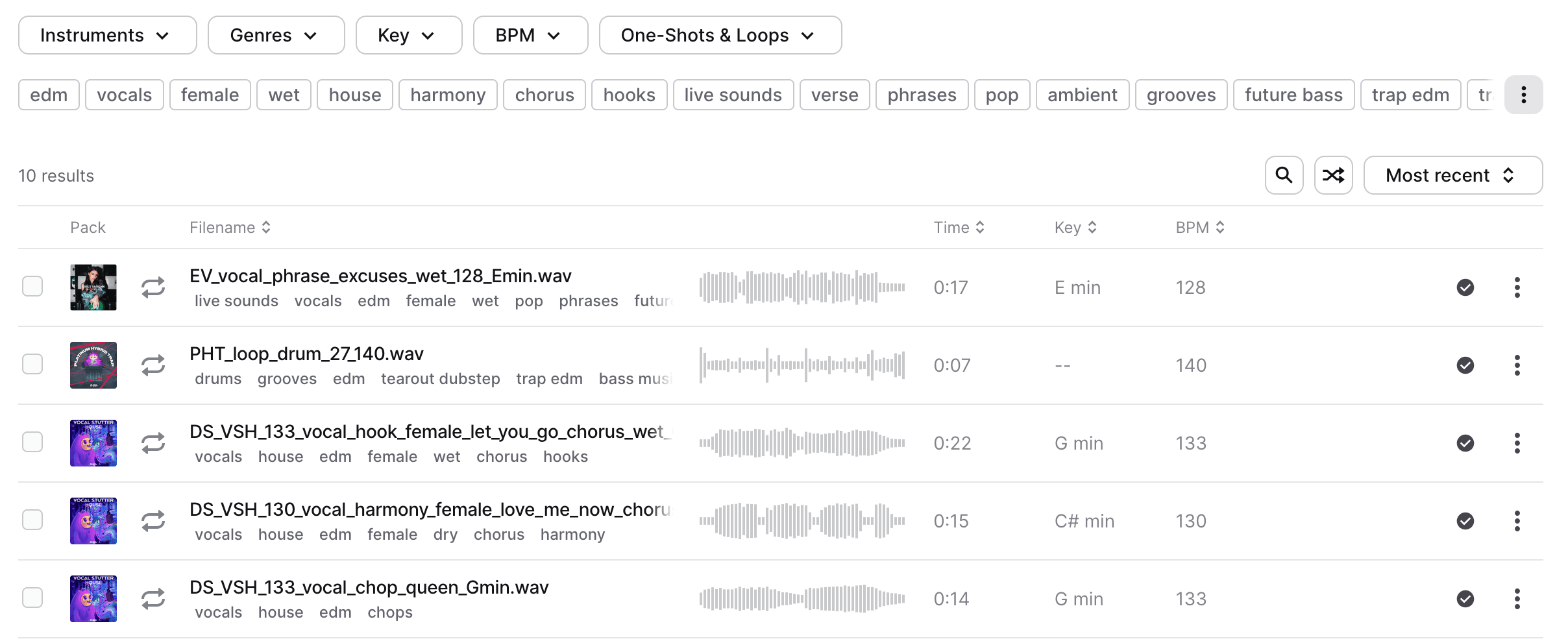
Find vocals and sounds on Splice
Example song with Splice and Suno

Table of Contents
- Introduction to Suno and Splice
- Finding the Perfect Vocal Sample on Splice
- Using Suno’s Extend and Cover Features
- Layering Styles for a Unique Sound
- Fine-tuning Your AI Song
- Tips for Optimizing Suno Prompts
- Conclusion
Introduction to Suno and Splice
Suno is a powerful AI music generation tool that allows you to create original songs using AI vocals and various musical styles. Splice, on the other hand, is a vast library of high-quality audio samples, including vocal snippets. By combining these two platforms, you can create unique, professional-sounding tracks that blend human and AI-generated elements.
Finding the Perfect Vocal Sample on Splice
To begin, browse Splice’s extensive collection of vocal samples. Look for a snippet that inspires you or fits the mood of the song you want to create. Once you’ve found the perfect sample, download it and prepare to use it with Suno.
Using Suno’s Extend and Cover Features
Now that you have your vocal sample, it’s time to leverage Suno’s powerful AI capabilities:
- Upload your Splice vocal sample to Suno.
- Use the “Extend” feature to build upon the sample, allowing Suno’s AI to generate complementary lyrics and melodies.
- Experiment with the “Cover” feature to reimagine the sample in different musical styles.
Remember to use Suno vocal tags to guide the AI in generating the desired vocal style and characteristics.
Layering Styles for a Unique Sound
One of the most exciting aspects of using Suno is the ability to layer different musical styles. Here’s an example of how you can create a multi-layered track:
-
Start with an ethereal pop intro:
Suno prompt: "Ethereal pop, dreamy synths, soft Suno vocals, atmospheric pads" -
Transition into an R&B/hip-hop mix:
Suno prompt: "R&B hip-hop fusion, smooth singer, trap beats, melodic rap" -
Add depth with an electronic layer:
Suno prompt: "Electronic elements, glitch effects, pulsing bassline"
By combining these layers, you’ll create a rich, textured song that evolves and keeps listeners engaged.
Fine-tuning Your AI Song
After generating your layered track, listen carefully and identify areas for improvement. Use Suno’s cover feature to regenerate specific sections until you’re satisfied with the result. Pay attention to the Suno lyrics and adjust the prompts to refine the content and emotional delivery of the AI vocals.
Tips for Optimizing Suno Prompts
To get the most out of Suno’s AI music generation, consider these tips:
- Be specific with your genre descriptions (e.g., ”90s West Coast hip-hop” instead of just “hip-hop”)
- Use Suno vocal tags to define the characteristics of the AI singer (e.g., “raspy voice”, “powerful high notes”)
- Experiment with unusual genre combinations to create unique sounds
- Include specific instrument requests in your prompts
- Describe the desired emotion or mood of the song
Conclusion
By combining Splice’s vast sample library with Suno’s advanced AI music generation, you can create professional-quality tracks that blend the best of both human and artificial creativity. Experiment with different vocal samples, layer various musical styles, and fine-tune your prompts to produce unique and engaging AI songs that stand out in today’s music landscape.
Remember, the key to success is experimentation and iteration. Don’t be afraid to try new combinations and push the boundaries of what’s possible with AI music creation. Happy producing!